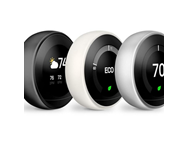
I bought 3 of these as factory reconditioned. Only one would communicate with my wifi system. Google RMAed one of them and said the other one was out of warranty so I am only using two of them. Since Google would not replace the third one, I have refrained from buying 5 more Nest thermostats for my home. I have a total of 7 thermostats for my zoned system. Two are installed and I will not buy anymore since Google refused to replace one of the three. If they are sold as “factory refurbished” they should not contain bad wireless chips.
Google is ending support for their 1st and 2nd gen thermostats on Oct 25. Recently they ended support for the early gen Nest Cam. That forced me to throw out 4 cameras. With the recent thermostat announcement, I’ll be forced to throw out two thermostats.
Google is not getting another dime of my money. I will never trust or use Google hardware again.
Came here to post this exact comment. Such bullshit that Google kills off its older products.
Hi there. If you bought from Woot, did you reach out to customer service to return the item? They’re happy to help.
WiFi going bad on these is a known problem. I just had one replaced under warranty…for the second time.
I had the same problem. Bought 3, but 2 of them had bad wifi chips and I had to return them. If selling as refurb, that should have been tested.
2 out of 2 defective cost me a lot of time
Ordered 2 and only one worked. The other had the Wifi issues noted above.
I have to say the 2 units were also beaten up pretty badly with severely scratched screens and chipped paint (white units). I’m not certain where these are coming from to be in such bad shape.
Please reach out to Woot! Customer Service. To speed things up, let them know if you prefer a return/refund or a replacement (if possible).
Please allow 24-48h for them to respond.
Self-Return: Items without Li-Ion batteries can be self-returned within 30 days. Go to your Order Details to get started. The return label will be emailed from UPS.
Browser: Use the Woot! Customer Service form.
Woot! App: Choose Account from the bottom navigation and then Support.
Note: Woot! Customer Service replies go to the email address on your Woot! account, not your Amazon login email if used/different.