
Any idea if these are compatible with Carrier Infinity systems?
Probably.
Remind me again why a thermostat needs to be able to make calls, order a robot vacuum (which may or may not be taking pictures of you) around, and otherwise do non-thermostat-y things??
They are. Until last month I had a Carrier Infinity furnace (just replaced with a Bryant unit made by Carrier) in tandem with a Carrier heat pump. I’ve been using Ecobee 3 thermostats.
Convenience
Supposedly to work with Alexa, but it’s microphone is horrible and I disabled the Alexa functionality due to repeat/echoing of Alexa responses from the Ecobee and my other Amazon Echo devices.
When I do a general internet search for these thermostat models, I don’t find an “ecobee4” or “ecobee5”. All I find is “Smart Thermostat Enhanced” or “Smart Thermostat Premium.”
Are the 4 & 5 older models, are 4 and 5 simply alternate references to the “Enhanced” and “Premium”?
I’m trying to find out what the differences are in the models.
ecobee 4 is the 4th gen device
https://www.amazon.com/ecobee4-Thermostat-Built-Sensor-Included/dp/B08BZTPMW1
ecobee 5 is the 5th gen device
https://www.amazon.com/ecobee-SmartThermostat-Voice-Control-Black/dp/B07NQT85FC
The enhanced and premium are the 6th gen devices. The Enhanced is pretty much a 3 lite with a smoother frame. Premium is just an ecobee 5 with the same prettier frame.
Can the room sensor on these be disabled? My thermostat is in a room I’m rarely ever in and I don’t want to put remote sensors all over my house just to keep the heat on. I will just program it to change temperatures at certain times like my current programmable thermostat.
That said, I DO want to add 1 remote sensor, but that’s only to adjust to temperature in a different area of the house compared to where the thermostat is.
You can certainly set different comfort levels and different schedules, but I think you do have to set a temperature range. If you are not concerned with it getting too hot or cold, I guess just max-out the extreme high and low ranges so it runs constantly during those times. Probably not great for efficiency, though.
We have several remote sensors that apply to most comfort settings so it uses an average house temp to tell it when to run. Looks like I could remove the thermostat sensor so its temperature reading is not considered, but I don’t know if you need at least 1 remote sensors to do that.
Yeah, I’d still set a temp range. Forgetting remote sensors for the moment, since these don’t come with any, the info on these ecobee thermostats mentions something about detecting when people are home or not based on motion detection. My concern is that, as I mentioned, the thermostat is in a room that I may not go into for days, or even sometimes weeks. (I live alone.) I don’t want the thermostat to think I’m not home and adjust the temp based on that.
I’d rather just be able to program it to change temperature at certain times of day, which is how I have my current thermostat set up.
You can turn the “follow me” option off as well as the smart home/away or eco+ as it is now called. The motion sensors can automatically switch comfort modes which could save you money if you want it to detect when nobody is home and therefore you can afford to make the house less comfortable.
You can create custom comfort settings with a default home/away value and schedule those comfort settings to apply to certain times of day.

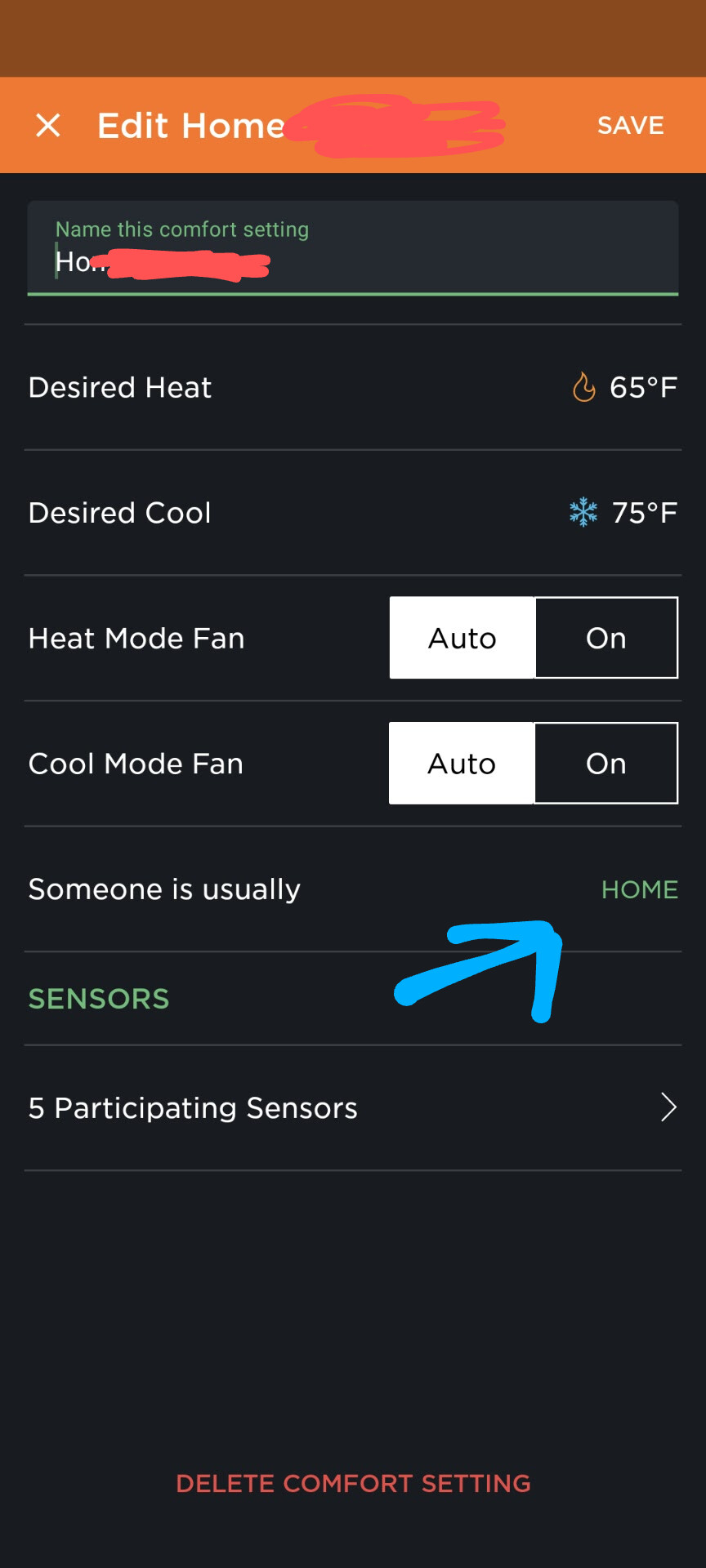

So, just turn off the follow me setting and schedule “home” comfort settings all day every day, so it never has an option to switch to an “away” mode.
Thanks! Although simply scheduling “home” all the time isn’t what I want either. On my current thermostat I have it change temps 4 times per day. Using heat as an example, since it’s winter… At 6:00 AM it heats up so it’s warm for me to get out of bed. At 8:00 am after I go to work, it cools off again during the day. At 4:00 PM bit before I usually get home from work, it heats up again for the evening. Then 10:00 PM, about the time I go to bed, it cools off for the night.
On the weekends it’s just 2 temp changes. Warm in the morning and stays that way all day, then cool for the night again when I go to bed.
Yup, that’s all doable. Of course you can always manually override the temp setting and it will stay at that setting until the next scheduled change.
I just meant you might have a “home” morning setting, a “home” evening setting, and a “home” sleep setting. It shouldn’t deviate to any “away” setting even if it detects no motion if you have the “follow me” and “smart home/away” off.
Thanks!
I posted the question about the occupancy sensor on the ecobee Reddit and they pointed me to this support article, that explains it pretty well. The ecobee still has the typical scheduling capability, and the occupancy sensing (Smart Home/Smart Away) is only used to override the schedule, but yes, that feature can be turned off.
https://support.ecobee.com/s/articles/Smart-Home-Smart-Away-and-Follow-Me-Features
From all the reviews and general info I was reading on other sites, they almost made it sound like the occupancy sensing was the primary method of controlling home or away temperatures and didn’t mention the scheduling capability at all.
So after all my research, I went ahead and ordered the ecobee 5. I received it today but there is no indication on either the packaging or device itself as to what specific model it is. How can I be sure I actually got the “5” and not the 4?
Got some photos and such here:
https://support.ecobee.com/s/articles/Identify-your-ecobee-thermostat-model
No mention of 5, though…
Is there a model # along with the serial # on the back?
There is no model # label anywhere on the thermostat itself or on the box it came in. Based on that ecobee web page, the 4 and 5 look physically identical so that’s no help either. When I look at the “About” info in the app or on the thermostat itself, it does say “Smart Thermostat with Voice Control” which I THINK is the 5?
But the 5 is supposed to have a built-in Alexa speaker, right? I can’t find any way to set up the Alexa speaker. I’ve enabled the ecobee skill in Alexa and can control it with Alexa from other Echo devices in myself, but I can’t find any way to set up the built-in alexa in the thermostat itself.