So, does this thing make each computer appear as a mass storage device to the other, or what? It claims “no software required” but then it claims to be Windows only and talks about “autoloading software”. And they provide a driver for Windows 98 but it’s not a link to the USB mass storage driver on Microsoft’s site but some branded poop. So they’re doing a good job of talking themselves out of a sale here.
This should come in handy since my external hard drive enclosure broke. I’m hoping this is easier and faster than my previous methods.
[QUOTE=janis2, post:108, topic:222311]
I’m really feeling invisible … Once again…does anyone know if you can transfer audible files (ie: Audible manager) from one computer to another with this. I’m thinking how great it would be to transfer all my audio books to my friends computer if I wanted.
[/quote]
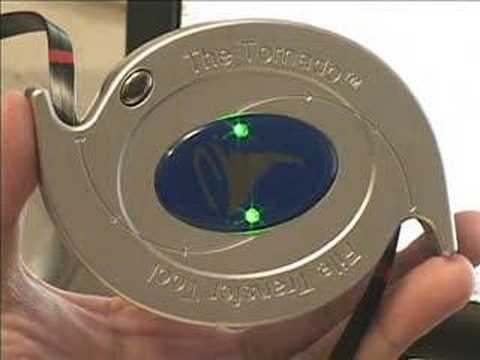
Yes, Janis2, you can do this easily. I have another very similar brand of this item and it works quite simply. There is no setup required. The little device between the 2 cables contains memory in which there is a self-loading program. When the device is plugged in it loads on each computer to which it is attached and displays 2 windows. Each window shows (something like) My Computer for both of the computers. Find what you want and copy it to the location you want. Not sure about Audible Mgr finding it.
Normally I would just pull the hard drive and connect it to the other computer. Even if one is a laptop, with converters to USB this is typically the way to go. However, I went out doing some contract work last year and needed to transfer files to a new computer and the client had purchased the tornado. I used it and found it a great device - easy to use and transferred files quickly.
I’ve never used PC Eraser - I just use DBAN.
By connecting it to another computer can we use the sofware of other computer? ie., like external harddrive
Decent link on using the tornado.
Holy HDMI Batman, this Monoprice site is fantastic…Thanks for the lead!
[QUOTE=airtimecellular, post:27, topic:222311]
I bought one of these before. Transfer rate is pretty fast but there is a 4GB file size limitation. This loads in your PC as a CD rom drive so any files larger than 4 GB it will not transfer. I would pay $10 for it, not at this price.
[/quote]
[QUOTE=robor007, post:168, topic:222311]
The file system limits file size, not the transfer media.
[/quote]
[QUOTE=handlin, post:183, topic:222311]
There is no setup required. The little device between the 2 cables contains memory in which there is a self-loading program. When the device is plugged in it loads on each computer to which it is attached and displays 2 windows. Each window shows (something like) My Computer for both of the computers.
[/quote]
This information seems contradictory. handlin, if it’s not a standard USB MSC device, then setup is indeed required. I would think of getting this to let my Linux laptop appear as a USB client rather than host, but “self-loading program” my shiny metal ass.
Eraser is a program for wiping your HDD clean of all traces of left files, after the transfer.
janis2, be careful. Audible files are DRM-encumbered. Meaning you don’t own the files even if you purchased them outright. You get “permission” to transfer the files (individually or as the whole library only, not sure) to 3 computers only. Even in a situation where you have a legal right to do something with the file (fair use) there is a law which bans you from working around their restrictions, meaning your legal rights are unusable in practice. This is why it is technically illegal to play a DVD on most GNU/Linux-based computers and why if you are blind it is illegal for your screen reader to read Adobe PDF eBooks to you. If you don’t like this law, find a different audio book vendor and write your legislators.
deep breath
Anyway, before getting this device for this purpose you should find out how Audible wants to manage file transfers. If it wants to manage them you may have to do it over a network cable or put their software on the second computer and download from the site again. Or you might actually be able to copy the file via this device or any other transfer mechanism, then just connect to their license server to activate (3 times max). I would contact Audible to be sure.
Hey…
I’m George W!
Don’t 'cha mean
NUKULAR?
By connecting it to another computer can we use the sofware loaded on other computer in our system? ie., like external harddrive
Whether Sharing of DVD Drive iis possible? ie., inserting the DVD in one comupeter and watching it in another computer???
Pls guide me. Thanks
Since this makes the other computer appear as a drive, would you be able to use one computer to run a virus scan, or other utility, on the other computer?
[QUOTE=zikzak, post:23, topic:222311]
Heck yeah, especially if they both have Gigabit Ethernet, which would completely outrun USB 2.0.
MAC USERS: Before you ask “Will this work with a Mac?” please consider that you probably don’t have to care. Most recent Macs have Gigabit Ethernet and also, auto-sensing Ethernet ports, which means that contrary to earlier posts you do not need a crossover cable…just grab any Cat5 cable or better, plug it into both Macs, and transfer files at speeds significantly faster than FireWire 400, FireWire 800, or USB.
[/quote]
^^ Just liked PC’s
Will this device still do what it’s supposed to do if File and Printer Sharing is disabled on both computers?
[QUOTE=vsync, post:188, topic:222311]
This information seems contradictory. handlin, if it’s not a standard USB MSC device, then setup is indeed required. I would think of getting this to let my Linux laptop appear as a USB client rather than host, but “self-loading program” my shiny metal ass.
[/quote]
I am not sure what your problem is, but this device is for most versions of Windows. I stand by my statement that it is a self-loading program - unless the computer does not support USB 2 devices. Unless you have a polite correction to make, I see no reason for further comment.
[QUOTE=yadiboy, post:136, topic:222311]
How to transfer data between computers with a crossover cable in 16 easy steps
-
Drive to Best Buy. Buy a crossover cable. Of course, the dude at Best Buy might know what you’re talking about, and they might actually have one, but the probability of those two events converging is as remote as the genesis of sentient life in the universe.
-
Ask if there’s a computer store anywhere. Of course, most of these have gone out of business - except for the little shops in strip malls run by fat, somewhat greasy men of indeterminate ethnic origin. Nobody knows where these strip mall shops are, though they have a vague recollection of passing by one just last week.
-
Go to Greybar and purchase 1000 ft of Cat5e - because that’s pretty much the quantity at which you can buy raw Cat 5e. It’s also cheaper to purchase 1000 ft of Cat5e than it is to purchase a single 8ft cable at Best Buy (especially if you get the special extra-shielded one wrapped in the fancy wire mesh).
-
Go to Radio Shack and purchase a connector and crimping tool set (if you can find a store they haven’t closed).
-
Search for a wiring diagram for an Ethernet crossover cable on the Internet.
-
As it is your first time making a cable of any sort, you can expect to develop arthritis attempting to strip the cat5e, get the wires into the right channels, and successfully crimp. Of course, you won’t know if it actually works until you test it… but even then you won’t know if it works because it could be any number of other problems with Windows networking, etc.
-
Unplug your network cable - and plug in the crossover cable.
-
Plug the other end of the cable into the other computer.
-
Change your networking properties in TCP/IP configuration in Windows to be a static IP address. Change the networking properties on the other computer to be a different IP on the same subnet.
-
Unplug the crossover cable, plug in your regular ethernet cable, change back your TCP/IP settings to what they were… (it probably would have been helpful if you wrote them down)
-
Call technical support at your ISP to get the original TCP/IP settings. Restore them. Go to Google and look up “static IP address” and “subnet”.
-
Now that you’ve confirmed what you need to do, unplug your ethernet cable, plug-in the crossover cable, and change the TCP/IP settings to the static IP and subnet.
-
Open Windows Explorer… go to My Network Places and try to find the other computer.
-
Unplug the crossover cable, plug in your regular ethernet cable, change back your TCP/IP settings to what they were and Google that crossover cable diagram again, making sure that the order of wires is correct.
-
Clip the cable, re-strip, re-crimp until correct. Repeat as necessary. (Make sure you detach the cable from BOTH computers befor you clip it).
-
After two hours, give up. Go to Best Buy and purchase 32GB flash drive.
[/quote]
OMG, that is TOO funny ! And this IS how difficult it is if one is not a computer geek.
Many times over…
Can this transfer files between Vista and XP machines (without too much hassle)?
Can I use this for my laptop that won’t start up to get files off of it? It’ll turn on, just won’t start windows… I know the answer is probably “no”, but I thought I’d ask.