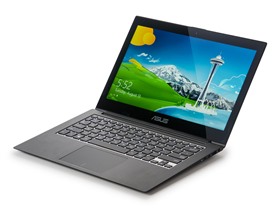
Asus 13.3” Full HD Core i5 Zenbook Touch

Asus 13.3" Full HD Core i5 Zenbook Touch
Price: $599.99
Shipping Options: $5 Standard
Condition: Factory Reconditioned

Comparison Links:
[Google Products](Asus - Google Search 13.3" Full HD Core i5 Zenbook Touch) - [Amazon](http://www.amazon.com/s/?field-keywords=Asus 13.3" Full HD Core i5 Zenbook Touch) - [Previous Woot Sales](Google 13.3" Full HD Core i5 Zenbook Touch)

[Preview 1][Preview 2][Preview 3][Preview 4][Preview 5][Preview 6][Preview 7]
http://d3gqasl9vmjfd8.cloudfront.net/d210a523-13aa-49c0-954f-97e0831abfb0.jpg

**Asus Zenbook UX31A-BHI511 Ultrabook 13.3” **
Price: $599.99
Shipping Options: $5 Standard
Shipping Estimates: Ships in 3-5 business days (Tuesday, Dec 17 to Thursday, Dec 19)
Condition: Factory Reconditioned

[http://www.wootstalker.com/images/buy.png

Buy It](Asus 13.3” Full HD Core i5 Zenbook Touch) [http://www.wootstalker.com/images/amazon.png

Search Amazon](http://www.amazon.com/s/?field-keywords=Asus Zenbook UX31A-BHI511 Ultrabook 13.3” ) [http://www.wootstalker.com/images/google.png

Search Google](Asus - Google Search Zenbook UX31A-BHI511 Ultrabook 13.3” )

Previous Similar Sales (May not be exact model)
9/26/2013 - $599.99 (Woot-off) - 17 comment(s)
8/20/2013 - $599.99 - 39 comment(s)

11/27/2013 - $599.99 (Woot Plus)
11/15/2013 - $599.99 (Woot Plus)
10/25/2013 - $599.99 (Woot Plus)

Good reviews from Amazon and BestBuy
Check out this “excellent” review over at pcmag.com

Check out this “very good” review over at cnet and the product page
[youtube=b33HtvwBgz8][/youtube]

I have about $500 in Amazon GC burning a hole in my pocket, I was excited to see that you can pay via Amazon… unfortunately it doesn’t support their Gift Cards. :confused:

ah, well.

I bought this from woot when they offered it a few weeks ago. Though it is refurbished, I couldn’t find any indication that it had been previously used. It looks brand new. It’s really a pleasure to use and I’d highly recommend it. It’s thin, light and highly portable. The 1080p screen is super nice and the keyboard is predictable and comfortable. The touchscreen is responsive, though I don’t really use it. The processor and SSD are fast. The 4GB RAM is kind of a bummer since it’s not upgradeable, but so far it’s been ok. Battery life has been about 6 hours. I don’t like windoze, so I’m running Linux Mint on it, which was surprisingly easy to configure (all the function buttons work). It didn’t come with a sleeve but did include the VGA and ethernet adapters, and the power supply of course. The 90 day warranty is a little scary, but at this price, it’s acceptable. Overall, I’m very happy I bought it.

I’m a pretty harsh critic of many of the computer / laptop deals on woot, but I quite like the Zenbook Touch, and this is a decent price.

I don’t keep close enough tabs on prices to comment on the value of this deal, but I’ve got a non-touch UX31 (i7 though), and no complaints.

It’s an excellent ultrabook, good battery life, good construction, etc. Basically, it’s been exactly what the spec sheet presented it as.

While a matter of personal opinion, aesthetically I think it blows away even the Apple products, the finish and lines on it look fantastic.

[QUOTE=millerm277, post:9, topic:404162]
I don’t keep close enough tabs on prices to comment on the value of this deal, but I’ve got a non-touch UX31 (i7 though), and no complaints.

It’s an excellent ultrabook, good battery life, good construction, etc. Basically, it’s been exactly what the spec sheet presented it as.

While a matter of personal opinion, aesthetically I think it blows away even the Apple products, the finish and lines on it look fantastic.
[/quote]

Have you seen the Samsung Series 9/ATIV 9s? I’m looking at replacing my i5 Series 9. I love the size, weight, and looks, and it’s a great computer when it works, but it’s now being serviced for the third time in a year for the exact same problem (the onboard audio suddenly fails), and now that it’s in SquareTrade’s hands I doubt they’re going to replace literally everything except the display (which is what Samsung did the first two times) so I’m expecting a call in the next couple of days telling me that they’re giving me the check.

I’ve been looking at the new i5 ATIV 9+. Those cost twice as much as this guy, while having pretty much the same specs (differences: Samsung’s processor is 1.6 GHz, but has the HD 4400 graphics). It’s really tempting.

The “add to cart not working” issue also prevents me from seeing the stats tab… can someone tell me if this has an HDMI output, and also what the screen resolution is?

[QUOTE=nikkipoooo, post:10, topic:404162]
Have you seen the Samsung Series 9/ATIV 9s? I’m looking at replacing my i5 Series 9. I love the size, weight, and looks, and it’s a great computer when it works, but it’s now being serviced for the third time in a year for the exact same problem (the onboard audio suddenly fails), and now that it’s in SquareTrade’s hands I doubt they’re going to replace literally everything except the display (which is what Samsung did the first two times) so I’m expecting a call in the next couple of days telling me that they’re giving me the check.

I’ve been looking at the new i5 ATIV 9+. Those cost twice as much as this guy, while having pretty much the same specs (differences: Samsung’s processor is 1.6 GHz, but has the HD 4400 graphics). It’s really tempting.

The “add to cart not working” issue also prevents me from seeing the stats tab… can someone tell me if this has an HDMI output, and also what the screen resolution is?
[/quote]

screen reso is 1920x1080p, which looks great on this size screen. It only has micro HDMI out included, you’ll need the little adapter to make it regular size, i thought it was included by the pictures but i see that’s not an HDMI selection, that’s a deal buster for me

[QUOTE=whohat, post:7, topic:404162]
I bought this from woot when they offered it a few weeks ago. Though it is refurbished, I couldn’t find any indication that it had been previously used. It looks brand new. It’s really a pleasure to use and I’d highly recommend it. It’s thin, light and highly portable. The 1080p screen is super nice and the keyboard is predictable and comfortable. The touchscreen is responsive, though I don’t really use it. The processor and SSD are fast. The 4GB RAM is kind of a bummer since it’s not upgradeable, but so far it’s been ok. Battery life has been about 6 hours. I don’t like windoze, so I’m running Linux Mint on it, which was surprisingly easy to configure (all the function buttons work). It didn’t come with a sleeve but did include the VGA and ethernet adapters, and the power supply of course. The 90 day warranty is a little scary, but at this price, it’s acceptable. Overall, I’m very happy I bought it.
[/quote]

Can you comment on the startup time before you switched to Linux?

Also, SquareTrade has been great any time I’ve had to deal with them, and I’d definitely recommend spending the $80 on a one year plan, or even going for the 2 year plan.

For instance, with my current ultrabook I called because I couldn’t log into the site to make a claim and less than 10 minutes later I had my claim made and was off the phone. The next day the box to ship it in arrived, was easy to prepare, and within 2 days of FedEx receiving the package my claim had been approved and the repair evaluation had started. That was Monday, and they have a “5 days in house max” policy, so I will know by tomorrow what the outcome is.

I have some questions for people who have owned this or something similar. The only laptops I’ve ever had have been the traditional kind with HDDs, optical drives, etc.

My vision is not very good. Sometimes I have trouble reading small print. Isn’t the print very small on a 13.3 inch screen running at that resolution? I know that Windows will let you adjust the display text size and some other features to make things easier to see, but I’m wondering about crowding that much detail onto such a small screen. Any comments or advice?

With no optical drive, how do you install a program from a CD? I’m thinking I could make the computer part of my home network and give it access to the desktop, which would allow it to read the desktop’s optical drive. Any comments on that?

128GB isn’t enough storage for me. I would need to use the SSD for installed programs and keep the data somewhere else. I have some 128GB flash drives, but they’re pretty slow even in a USB3 port. How about a Class 10 64GB SD card for storage? That would be very convenient. Any thoughts on if it would be fast enough? I know the SD cards vary a lot in speed and I would make sure to get a fast one.

That’s three questions - display, installing programs, and data storage. I will very much appreciate any helpful responses about those questions, and thank you.

[QUOTE=lorenzodemedici, post:13, topic:404162]

That’s three questions - display, installing programs, and data storage. I will very much appreciate any helpful responses about those questions, and thank you.
[/quote]

I know there are ways around the display issue (the laptop I’m looking at his much higher resolution, so it’s a big topic there) but I’m not sure exactly how they work.

I bought an external bluray, so I just use that when I need to use a CD-ROM, though I’ve used it very rarely because most things I need to install can be downloaded now.

I back everything up to the cloud. The biggest storage issue for me was music, but now I just keep the majority of that on an external HDD anyway.

[QUOTE=whohat, post:7, topic:404162]
I bought this from woot when they offered it a few weeks ago. Though it is refurbished, I couldn’t find any indication that it had been previously used. It looks brand new. It’s really a pleasure to use and I’d highly recommend it. It’s thin, light and highly portable. The 1080p screen is super nice and the keyboard is predictable and comfortable. The touchscreen is responsive, though I don’t really use it. The processor and SSD are fast. The 4GB RAM is kind of a bummer since it’s not upgradeable, but so far it’s been ok. Battery life has been about 6 hours. I don’t like windoze, so I’m running Linux Mint on it, which was surprisingly easy to configure (all the function buttons work). It didn’t come with a sleeve but did include the VGA and ethernet adapters, and the power supply of course. The 90 day warranty is a little scary, but at this price, it’s acceptable. Overall, I’m very happy I bought it.
[/quote]
Isn’t this $100 more than last time??

[QUOTE=lorenzodemedici, post:13, topic:404162]
I have some questions for people who have owned this or something similar. The only laptops I’ve ever had have been the traditional kind with HDDs, optical drives, etc.

My vision is not very good. Sometimes I have trouble reading small print. Isn’t the print very small on a 13.3 inch screen running at that resolution? I know that Windows will let you adjust the display text size and some other features to make things easier to see, but I’m wondering about crowding that much detail onto such a small screen. Any comments or advice?

With no optical drive, how do you install a program from a CD? I’m thinking I could make the computer part of my home network and give it access to the desktop, which would allow it to read the desktop’s optical drive. Any comments on that?

128GB isn’t enough storage for me. I would need to use the SSD for installed programs and keep the data somewhere else. I have some 128GB flash drives, but they’re pretty slow even in a USB3 port. How about a Class 10 64GB SD card for storage? That would be very convenient. Any thoughts on if it would be fast enough? I know the SD cards vary a lot in speed and I would make sure to get a fast one.

That’s three questions - display, installing programs, and data storage. I will very much appreciate any helpful responses about those questions, and thank you.
[/quote]

I bought this from woot a few months ago.

I don’t mind the screen size once i increased the size. The higher resolution means you can sit closer to the screen before the pixels makes it blurry. it a really nice screen for this size.

I haven’t used a optical drive in years so I cant comment.

For me this is a secondary computer i don’t put allot of files and videos on it. Not even my music(40gb). All my stuff is on my main desktop. I only instal a few game and programs and the occasional movies which I delete soon after. If you really need allot of storage with you, you could get a good external HDD, 1 tb for about 70-80, they transfer at ~110 mb/sec. that should meet your needs. Dont get an SD card if you plan to leave it in, it will stick out by quite a bit.

I picked up one of these the last time around, and absolutely love it.

It’s light, sexy thin, and when I installed OpenSuSE Linux on it, 99% of everything worked out of the box. (required a tiny tweak to make the backlight function keys work).

[QUOTE=mattpope84, post:11, topic:404162]
screen reso is 1920x1080p, which looks great on this size screen. It only has micro HDMI out included, you’ll need the little adapter to make it regular size, i thought it was included by the pictures but i see that’s not an HDMI selection, that’s a deal buster for me
[/quote]

The lack of a micro-HDMI adapter is a deal-breaker? They are < $3 on eBay (Buy it Now, US Seller). Am I missing something?

http://www.ebay.com/sch/i.html?_sacat=0&_from=R40&LH_BIN=1&_sop=15&_nkw=micro+hdmi+adapter&rt=nc&LH_PrefLoc=1

I have the non-touch UX31a I bought off CL from some guy for a little less. (since they were always insta-sold-out on Woot, I couldn’t wait LOL)

Anyway, I am pretty happy with it. It’s ridiculously light and thin, and that IPS 1080 screen is stunning to look at.

My only complaint (and I can’t complain because I bought it KNOWING this) is that you can’t upgrade the RAM or HDD. If you’re ok with this, then this thing is really a sweeeeeeet laptop.

I do a lot of photo work with Lightroom, and while it’s not quite beefy enough to handle the really large jobs, the main reason I got it for photo work was the screen. It just looks AMAZING, even compared to my big 24" desktop screen. It’s made me want to upgrade my desktop to a big IPS display now.

It’s never going to be a gaming machine as it’s just running Intel graphics, and limited in RAM, but as an everything else machine, this is the one to covet if you don’t have one, especially at this price point. I’ve been traveling with mine already and it’s a joy to pull out and use anywhere. The keyboard types very nicely and I could sit down and do quite a bit of work on it. Again, I love the screen, especially it being the 1080p screen and having all that real estate to work with vs all the other run of the mill crappy 720p screens.

The only thing I added to it that stays on it is one of the Logitech unifying receivers for my mouse that permanently lives in one of the USB ports, but it having built in bluetooth, you could always spring for one of those mice and be dongle free.

Battery life is mind blowing, but it also goes into EXTREME battery saving modes to do so. If you want to extend battery life, and setup all the power saving modes, the CPU drops down to a measly 800Mhz. Its super slow, but is supposed to speed up as demand increases (I’ve watched it do so with CPUz). But because of this, I was able to lay in bed sick one weekend and get about 6 solid hours of network movie streaming off it before I had to plug it in. Just doing light work, and I got a few more hours past that out of it.

GREAT little laptop. Not a powerhouse when unplugged (unless you turn off the power saving features and run full steam ahead) but it does the job and does it well. Everyone that’s looked at it is blow away at the size.

I do have one thing to nit-pick about the ad pics: IT IS NOT IN THE SAME CLASS AS A MACBOOK PRO! STOP COMPARING IT WITH THAT IN THE PICS…it’s in the same class with the macbook AIR… apples to apples when comparing please!

A couple months ago I bought this for $499 from Microsoft Store:
http://www.microsoftstore.com/store/msusa/en_US/pdp/Acer-Aspire-V5-573P-6896-Touchscreen-Laptop-Intel-Core-i5/productID.288024500- but no longer on sale. Acer Aspire V5-573P-6896 -full HD 15.6 inch, 4gb ram (but able to upgrade- I currently have 8gb in there now),I5. Upgraded it to 8.1 with no problems. No SSD but at this much cheaper, I rather add my own. Very compact and light form factor. That’s why today’s offering is decent, but not awe inspiring.